BOHA! WorkStation: Mobile Labeling for Teams That Bring the Screen to the Work
Stephen Crump
Back-of-house workflows don’t all take place next to the printer
In the back of house, labeling often looks like a printing task.
Someone needs a label, walks to the hardware, selects what they need, and prints it. In some operations, that model works well because the labeling decision happens close to the printer. Prep containers, ingredients, storage bins, and grab-and-go items are all moving through the same area, and the team can return to one shared station throughout the day.
But not every operation is set up that way.
In many foodservice environments, the labeling decision starts at the case, cooler, counter, prep table, storage area, or production zone, not at the printer. A staff member may need to inspect the work area first, confirm what is actually needed, validate the item, check the quantity, or decide which label should be printed before returning to the labeling station. That extra step may be manageable in some kitchens, but in larger or more distributed operations, it can add walk-backs and memory-based decisions into a process teams repeat throughout the day.
For some back-of-house teams, the better setup is not only a printer that can handle the volume. It is a mobile food labeling system that lets trusted staff bring the screen closer to where the work takes place before the label is printed, the timer is started, or the step-by-step workflow has begun.
BOHA! WorkStation brings the screen to the work
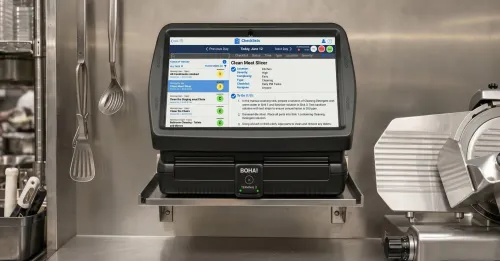
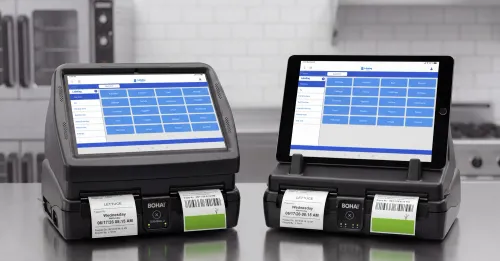
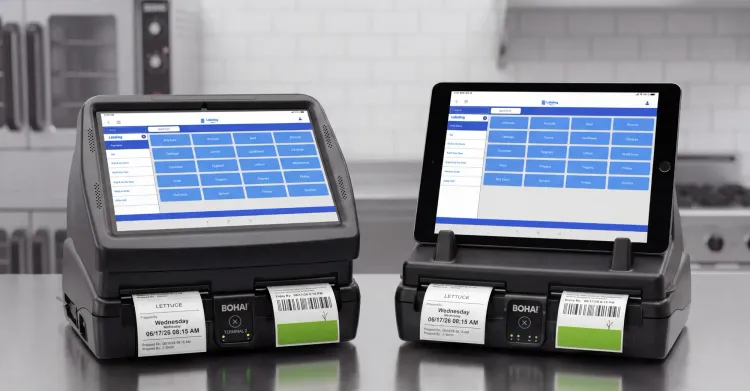
BOHA! WorkStation is a mobile back-of-house labeling system that combines high-volume, versatile printing with a detachable tablet, allowing staff to bring the BOHA! Labeling application to the place where work is happening.
For teams that label prepared food across cases, coolers, counters, and prep areas, that makes WorkStation a mobile food prep labeling system built around where the labeling decision actually happens.
That’s the role WorkStation plays in the BOHA! hardware portfolio. It gives teams a way to access BOHA! labeling workflows from the point of work, validate what needs to happen, and trigger the right label without forcing every decision to happen beside the printer.
Like BOHA! Terminal 2, BOHA! WorkStation supports high-volume BOHA! labeling and workflow access. The difference isn’t the labeling foundation, it’s where the screen can go.
With BOHA! Terminal 2, the screen and printer stay together in a fixed station. That setup can be a strong fit for operations that want a shared, anchored access point for labeling and other BOHA!-supported workflows. BOHA! WorkStation supports a different operating model. The printer remains available for high-volume label output, while the detachable tablet gives trusted staff a way to bring the screen to the work area.
That mobility changes how the workflow feels during the shift.
Instead of checking a display case, walking back to a printer, trying to remember what was needed, selecting the label, printing it, and returning to the case, the employee can bring the tablet to the decision point. They can confirm what they are seeing, select the right item, and trigger the label while the work is still in front of them.
Some operators may describe this need as tablet-based food labeling, a foodservice labeling workstation, mobile kitchen operations technology, or a wireless food label printer. Operationally, they are looking for the same thing: labeling access that fits the physical layout of the kitchen, not a process that assumes every decision happens at one printer station.
WorkStation is built for that kind of environment.
Why the detachable tablet changes the workflow
The detachable tablet changes the workflow because it separates the decision point from the printer location.
In a distributed back-of-house environment, staff members often need to make a decision after seeing what is happening in the work area. That may mean checking which items are missing from a grab-and-go case, confirming how many sushi trays need to be replaced, reviewing prepared ingredients in a storage area, printing a timer-linked label for ingredients ready to be used, or validating what needs a date-code label before it moves to the next step. In those workflows, the screen needs to be close enough to the work for the employee to confirm what is actually happening before a label is printed.
With a fixed screen, the staff member must carry that information back to the station. Sometimes that is simple. Other times, it creates room for small mistakes, especially as distance and complexity grow.
The details are often clearest while the employee is still standing in front of the work. The item, quantity, label type, or product version may be easy to confirm at the case, cooler, shelf, or prep table, but harder to remember and recreate once the employee has walked back to a fixed screen. The label should reflect what was just confirmed, not what someone is trying to remember after walking away.
A typical mobile labeling workflow may look like this:
- A staff member takes the tablet with the BOHA! SaaS platform’s Labeling application to the work area.
- They inspect what needs to be labeled, replenished, replaced, or prepared.
- They validate the item, quantity, timing, or label type while looking at the work.
- They trigger the correct label from the point of work in BOHA! Labeling.
- The label prints wirelessly through the BOHA! WorkStation.
The tablet is not mobile only for convenience; it helps align the label with what the employee just confirmed at the case, cooler, counter, or prep area. With WorkStation, staff can confirm the item or quantity and trigger the approved BOHA! Labeling workflow while the work is still in front of them.
Example: sushi, grab-and-go, and display case labeling
A sushi display case is a good example because the labeling decision often happens at the case.
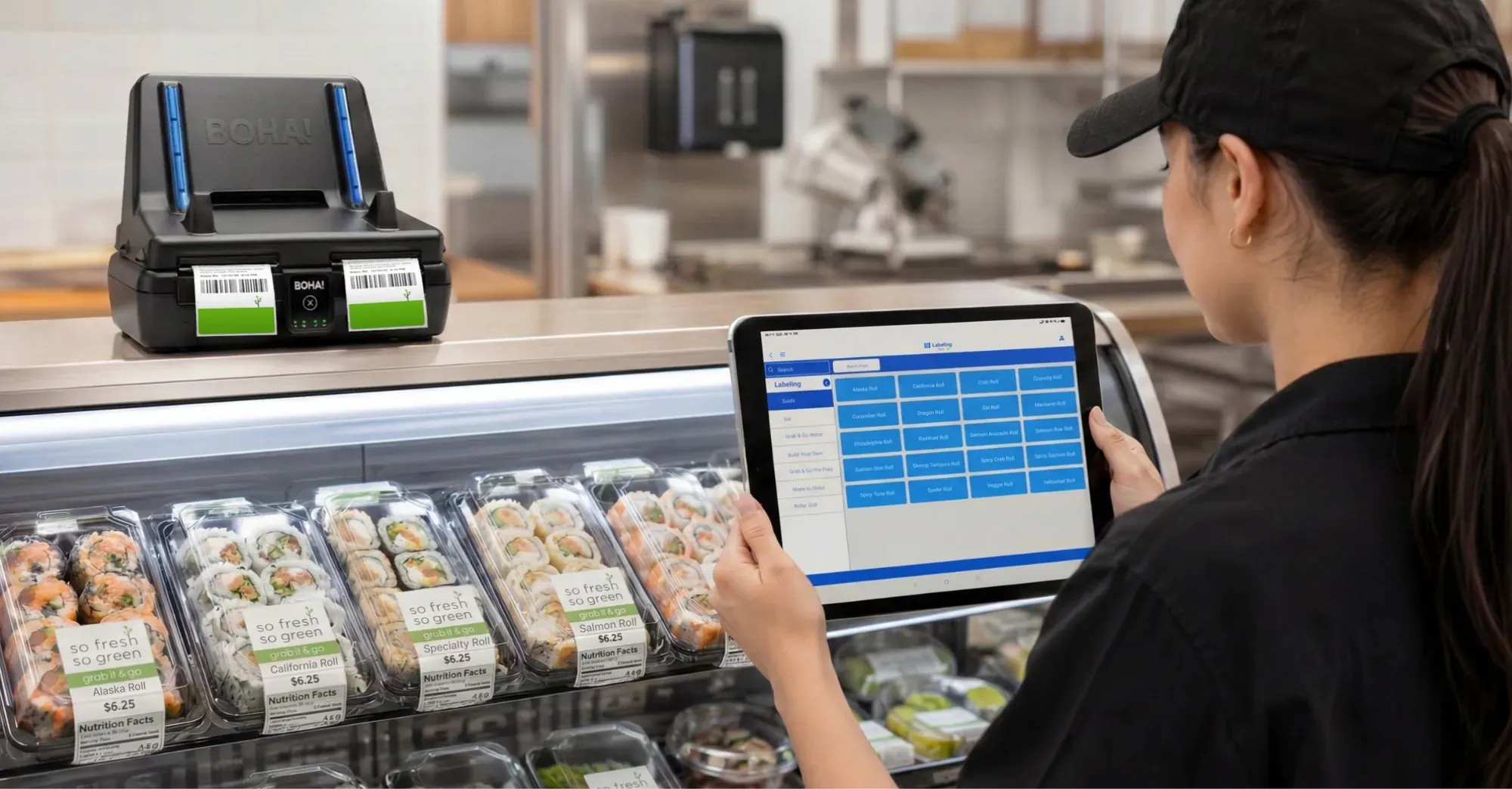
A staff member may walk up and see that spicy tuna rolls are low, salmon avocado trays need to be replenished, and a few grab-and-go items need updated labels before they are placed back into the display. The work area tells the employee what needs to happen. The case shows what is missing, what is moving, and what needs attention next.
If the labeling station is away from the case, the employee may need to inspect the display, remember the items and quantities, return to the printer, select the correct labels, print them, and then walk back. If something is unclear, they may have to repeat part of that process.
With BOHA! WorkStation, the employee can bring the tablet to the display case. They can look at the items, confirm what needs to be replaced or labeled, and trigger the correct labels while the case is still in front of them.
That workflow is simple, but the value is practical.
The employee does not have to rely as much on memory. They do not have to recreate the decision at a fixed screen after leaving the work area. The label selection happens closer to the operational moment that created the need.
The same pattern can show up in a variety of places: prepared food labeling on a commercial scale in a commissary kitchen serving multiple locations, or a coffee shop’s grab-and-go program. A staff member checking a cooler may see that several sandwiches need to be restocked, a salad tray needs a label, or a new batch of prepared items is ready to move into the case. With the tablet in hand, the team can confirm what needs to happen from the cooler instead of moving back and forth between the case and the printer.
That’s the idea behind point-of-work labeling: the label is selected from the place where the employee can see what needs to be labeled.
This kind of workflow can show up in sushi counters, display cases, grab-and-go coolers, commissary production areas, large prep kitchens, and storage zones where the work is spread out. In those environments, the screen needs to support the way people move through the space.
Where mobile labeling makes the most operational sense
BOHA! WorkStation is not the right fit for every workflow. Some operations are better served by a fixed station where the screen and printer stay together. Others need the screen to move because the work is distributed across the kitchen or store environment.
Some operations may use fixed and mobile BOHA! hardware in the same environment, depending on where different labeling decisions happen.
BOHA! WorkStation tends to make the most sense when trusted staff need to validate work before printing labels.
That can include operations with sushi counters, grab-and-go displays, large prep areas, production zones, storage areas, or multi-zone layouts where the employee needs to see the item or area before choosing the label. In those environments, the labeling decision may happen several (or many) steps away from the printer.
Mobile labeling can also support teams that already work in a more distributed way. A staff member may move from a prep area to a cooler, from a display case to a production table, or from one zone to another while checking what needs to be replenished or labeled. A tablet-based food labeling workflow gives that person a way to carry the screen with them instead of treating the printer location as the only decision point.
This is especially relevant when the work depends on judgment at the point of work.
An employee may need to confirm the item, quantity, batch, timing, or label type before printing. They may need to look at what is actually in the case, what has been prepared, or what needs to move next. In those moments, the mobile screen enables the right decision before the label is created.
The common thread is not size alone. A large kitchen may still work well with fixed stations if the workflows are centralized. A smaller operation may need mobile access if the work happens away from the printer.
The better question is where staff need to make the labeling decision. If they need to validate the item, quantity, batch, timing, or label type from the work area first, BOHA! WorkStation gives them a way to bring BOHA! Labeling access to that moment.
Mobile does not mean disconnected
A mobile screen should not create a separate process.
BOHA! WorkStation is still part of the larger BOHA! platform. Staff may bring the tablet closer to the case, cooler, counter, or prep area, but the labeling workflow still needs to reflect the approved information behind the item: label format, item details, ingredients, allergens, date codes, barcodes, nutrition details, and other labeling requirements configured for that operation.
The point of mobile access is not to let each person invent a process. It is to make the approved workflow easier to use from the place where the decision is happening.
It gives trusted staff more flexibility in how they access BOHA!-supported workflows, while still keeping the labeling process connected to the broader BOHA! SaaS platform. That can support standardized labeling workflows, food prep and labeling consistency, and better alignment between the work happening in the kitchen and the operational standards behind it.
For multi-location foodservice operations, mobile access still has to preserve labeling consistency across stores. A tablet can help teams work closer to the item, case, or prep area, but operators still need the labeling workflow to follow the same approved standards. BOHA! WorkStation supports mobile execution without turning labeling into a disconnected local workaround.
The screen can move, but the workflow remains connected and consistent.
Best fit for BOHA! WorkStation:
BOHA! WorkStation is best suited for operations where teams need to bring the tool to where the work is happening or where labeling decisions often happen away from the printer and staff need to validate the work before a label is printed.
It can be a strong fit for teams that need:
- A mobile food labeling system for distributed back-of-house work
- A detachable tablet that trusted staff can bring to the point of work
- Tablet-based food labeling for display cases, sushi counters, grab-and-go coolers, or prep areas
- A way to validate items, quantities, timing, or label types before printing
- Labeling access for large kitchens or multi-zone back-of-house layouts
- Mobile kitchen operations technology that still connects to BOHA! workflows
- Support for point-of-work labeling where the decision happens away from the printer
- Consistent label output tied to approved BOHA! Labeling workflows
For these operations, WorkStation gives teams a more flexible way to access the screen without disconnecting the labeling process from the broader BOHA! SaaS platform.
Next in the BOHA! Built series
BOHA! WorkStation brings the screen to the work.
In the next article, we’ll compare BOHA! Terminal 2 and BOHA! WorkStation directly so operators can think through whether fixed or mobile hardware better fits the way their teams work.
Frequently asked questions about BOHA! WorkStation and mobile labeling
Here are a few common questions about how BOHA! WorkStation supports mobile labeling, point-of-work validation, and BOHA! workflow access for foodservice operations where the screen needs to move.
What is BOHA! WorkStation?
BOHA! WorkStation is a mobile back-of-house labeling system that combines high-volume label printing with a detachable, mobile tablet. It allows trusted staff to bring the BOHA! screen to the point of work, validate what needs to happen, and trigger labels from where the labeling decision is being made.
When is BOHA! WorkStation useful?
BOHA! WorkStation is useful when labeling decisions happen away from the printer. This can include sushi counters, grab-and-go displays, prep areas, storage zones, production areas, large kitchens, or distributed back-of-house layouts where staff need to inspect and validate items before printing labels.
How is BOHA! WorkStation different from BOHA! Terminal 2?
BOHA! Terminal 2 keeps the screen and printer together in a fixed station. BOHA! WorkStation separates the tablet from the printer so trusted staff can bring the screen closer to the work when mobility is a better fit. Both support BOHA! Labeling workflows, but they fit different operating models.
What does the detachable tablet change?
The detachable tablet lets staff make labeling decisions at the point of work. Instead of inspecting a case or prep area, walking back to a printer, remembering the details, and selecting the label from a fixed screen, staff can validate the item, quantity, or label type while the work is still in front of them.
Is BOHA! WorkStation only for labeling?
BOHA! WorkStation is often used for mobile labeling workflows, but it is part of the broader BOHA! SaaS platform. Depending on the operation’s configuration, it can support the BOHA! SaaS platform with access to all the products BOHA! has to offer, including food prep and labeling standards, operational workflow execution, and store-level food safety consistency and audit readiness.
What is point-of-work labeling?
Point-of-work labeling means selecting or triggering a label from the place where the employee can see what needs to be labeled. In foodservice operations, that may be a display case, grab-and-go cooler, prep table, sushi counter, storage area, or production zone. BOHA! WorkStation supports point-of-work labeling by letting staff bring the tablet closer to the item or work area before printing.
Is BOHA! WorkStation the same as a wireless food label printer?
Operators searching for a wireless food label printer are often looking for mobile access to the labeling workflow. BOHA! WorkStation supports that need by pairing high-volume label output with a detachable tablet that staff can bring to the point of work, while keeping labeling connected to BOHA! workflows.