Stay in the loop!
Get the latest industry insights delivered straight to your inbox
Tony Janega
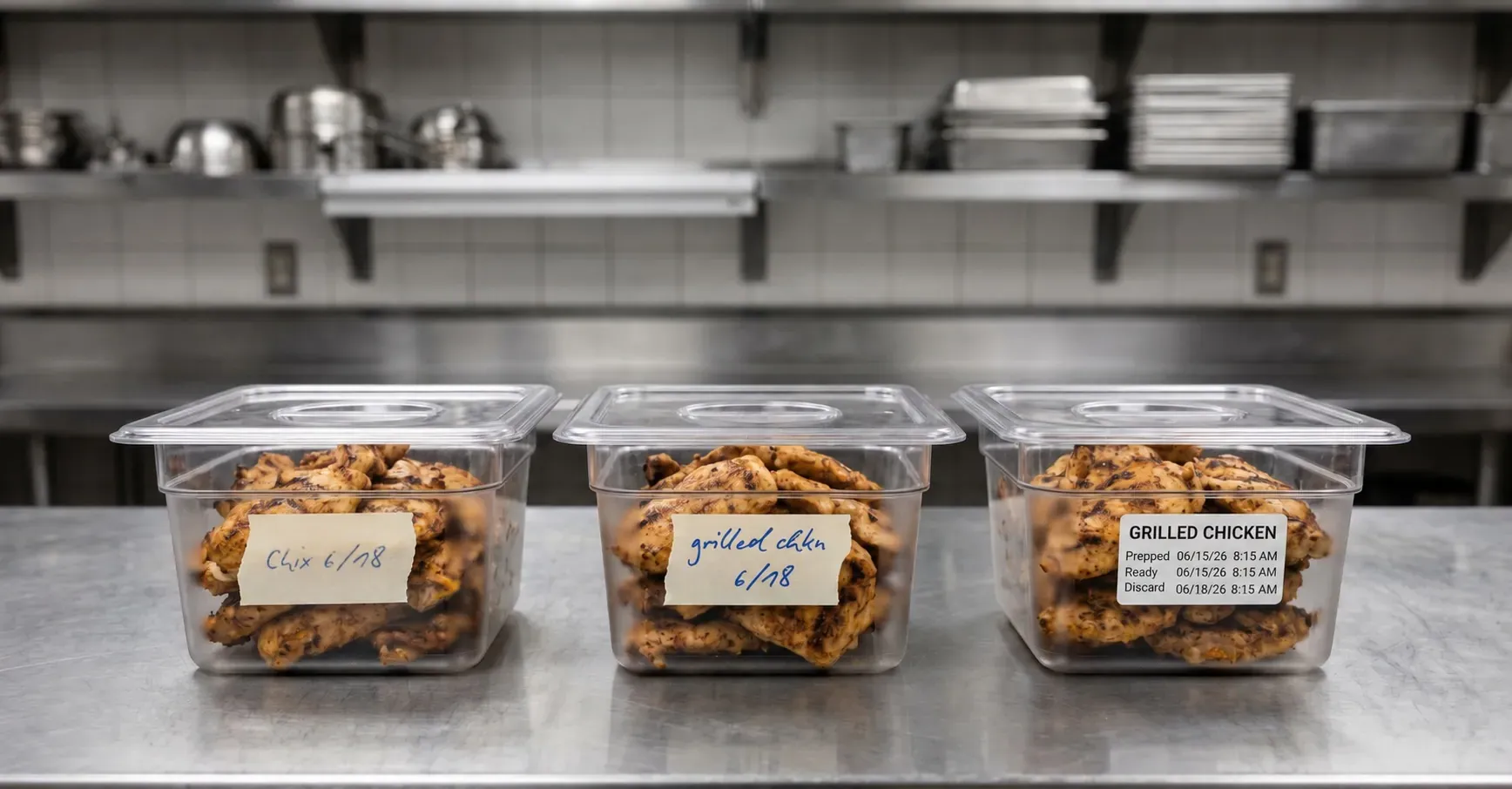
Handwritten labels can feel like the most straightforward option in the back-of-house, which is why the move to automated food labeling often starts with a simple question: how much of the current process depends on employee memory?
Someone grabs a marker, writes the product name, adds a date, sticks the label on a container, and moves on. For one label, that may be fine. However, multiplying that across a full prep day, it becomes harder to defend.
The marker is only the visible part of the entire labeling process. Before anything gets written, the employee has to know what the item should be called, which date belongs on the label, whether a time is required, and which format the store expects.
That’s a lot to put on memory during prep.
A team member may be labeling sliced tomatoes while restocking the line. Someone else may be labeling sauce cups while answering a question from the front. A newer employee may copy the format they saw on the last container, even if that format was already a shortcut.
That’s exactly how one store ends up with five versions of the same labeling process.
For operators trying to improve consistency, training, food safety, and kitchen efficiency, handwritten labeling leaves too much of the standard in employee memory. A modern food labeling system for restaurants helps move those decisions into a process the team can consistently and efficiently follow without rebuilding every label by hand.
Manual labeling creates more decision points than it looks like from the outside.
Start with the product name. One employee writes “grilled chicken.” Another writes “chix.” Another writes “chicken breast.” The team may understand all three during the same shift, but the label becomes less useful once the food moves to another station, another employee, or another daypart.
Dates add another layer. A container may need a prep date, use-by date, discard date, pull date, or a combination of fields depending on the product and workflow. A sauce, cut produce, cooked protein, bakery item, and grab-and-go sandwich may not follow the same shelf-life rules. If the employee has to calculate the date by hand or remember it from training, accuracy depends on how clearly that person remembers the standard during the shift.
The label type also changes the job. A prep label for an internal container does not need to do the same work as a grab-and-go label. A date-code label is different from a barcode label. A customer-facing packaged item may need clearer product identification than something stored in the walk-in.
None of that means the team is careless. It means handwritten labeling asks employees to make operational decisions while they are trying to keep food moving.
A single handwritten label rarely looks like the thing slowing a team down. That is why manual labeling can stay in place long after it starts creating friction.
The drag usually shows up around the label, not only in the act of writing it. Teams lose time finding markers, checking date rules, rewriting unclear labels, asking managers for clarification, and interpreting vague product names from the previous shift.
One or two moments may not seem worth fixing. Across dozens or hundreds of labels, those small pauses become part of the daily cost of manual labeling.
The bigger issue is that each interruption pulls attention away from the task the employee was already doing. A prep cook who stops to confirm a use-by date is no longer focused on the batch in front of them. A manager who has to check a label is being pulled away from food quality, team support, or service execution. A new employee who has to ask whether a time should be included is learning that labeling depends on asking the right person instead of following a clear process.
Automated food prep labeling reduces that friction by giving employees a starting point. Instead of beginning with a blank label, they can choose the item, use an approved format, print the label, and return to the work in front of them.
Modernizing food labeling should not make the back-of-house more complicated. Done well, it makes the correct label easier to produce.
With automated labeling, employees are not building every label from scratch. A food labeling system can give them approved label formats, product selections, date rules, and print options in one place. The employee chooses the item or label type, prints what they need, and moves on without rewriting the same information by hand.
That changes where the standard lives.
In a handwritten process, the standard often lives in training notes, posted instructions, manager reminders, and employee memory. In an automated process, more of that standard appears at the point of work. Product names stay more consistent because employees select them instead of inventing abbreviations. Date-code labels can follow the right rules without asking someone to calculate or remember every detail during a rush.
The same structure can support different label types without making the employee manage every variation manually. A prep label, grab-and-go label, barcode label, or customer-facing label can follow the format required for that use case.
Restaurant labeling software is useful when it takes pressure off the team. It should not make employees think harder about labels. It should help them produce the right label with fewer steps and fewer judgment calls to avoid the common culprits causing fresh food labeling systems to break down at scale.
One-touch printing can sound like a small convenience until you look at how often labels are created during a normal prep day.
Teams label sauces, proteins, produce, bakery items, pans, containers, grab-and-go products, catering items, and food moving in and out of storage. In high-volume operations, labeling is not occasional. It is part of the daily pace of the back-of-house.
When that work depends on handwriting, employees repeat the same manual steps throughout the day: writing product names, checking dates, choosing formats, and confirming details that should already be built into the process.
Printing from an approved format removes much of that repetition. For common prep items and recurring tasks, the employee can select what they need, print the label, and keep moving instead of rethinking the label every time. For recurring prep windows, batch printing can also help teams reduce one-by-one label creation by preparing labels by shift, location, or routine.
That also helps training. A newer employee can follow the system instead of trying to memorize every labeling rule at once. An experienced employee can move quickly without relying on shortcuts that may create inconsistency later.
Managers benefit too. When labels come from a standardized process, there is less handwriting to decode, fewer basic formatting issues to correct, and fewer repeat questions to answer shift after shift.
Labeling errors often look minor at first. A container may have a prep date but no use-by date, or a product name that makes sense to one shift but leaves the next shift asking for confirmation. A time may be missing. A date may be off by a day. The label is there, but it does not give the next person enough confidence to act on it quickly.
Those mistakes are easier to make when employees are recreating labels by hand while the shift is moving. Even strong team members can miss details when the process depends on memory, speed, and whatever can be written clearly in the moment.
Automation reduces the amount of guesswork built into the task. Approved formats make it clearer what information belongs on the label. Product selections keep names consistent. Date-code rules help limit manual calculation errors. Printed labels are also easier to read across shifts, stations, and storage areas.
For operators managing prepared foods, labeling also supports broader food safety procedures around product identification, date coding, storage, and rotation.
Operators still need clear standards and good training. Automated labeling does not replace food safety discipline, but it can make the expected process easier to follow during the day. The practical value is fewer labels to question and less dependence on every employee remembering every detail every time.
In a manual labeling environment, managers often become the safety net for a process that leaves too much room for variation.
They check dates, question vague product names, ask employees to rewrite labels, and explain the same format to new hires. Some oversight is expected in any food operation, but labeling should not require constant correction just to stay usable.
Store leaders have more important work to focus on: food quality, team performance, service execution, guest experience, and operational issues that actually require their judgment. When they have to keep decoding handwriting or re-explaining basic label standards, manual labeling is pulling their attention back into details the process should help prevent.
The training impact matters too. New employees are already learning the menu, prep flow, storage expectations, cleaning routines, equipment, and pace of the operation. Handwritten labeling adds another layer: what to write, how to write it, which dates apply, and which abbreviations are acceptable.
Automated labeling gives managers and new employees a stronger starting point. A printed label is not automatically perfect, but a guided workflow makes the standard easier to follow. Employees are not rebuilding the label from scratch on every shift, and managers have less basic correction work standing between the team and consistent execution.
Moving from handwritten to automated labeling fixes the workflow underneath the label.
Once labels no longer depend on handwriting, operators can think more strategically about what each label needs to do. Some labels support food prep and rotation. Some support barcode scanning or pricing. Some help with grab-and-go sales. Others carry ingredient, allergen, nutrition, pricing, barcode, or brand information, which is why customer-facing programs often need a clearer strategy for branded food labels vs. blank labels.
Those are design and program questions, but the foundation is the same: the operation needs a reliable way to produce the right label at the right time.
Handwriting can only take that so far because it depends on individual execution. Automation gives the process a more consistent structure. The label stops being a blank sticker filled out by whoever is on shift and becomes part of a standardized workflow that can support food safety, efficiency, training, and scale.
That foundation matters because the next stage of food labeling is not just about printing faster. It is about making each label work harder for the operation, the customer, and the brand.
Handwritten labeling may seem simple, but it asks employees to carry too much of the process in their heads. As food programs grow, that approach becomes harder to manage across products, shifts, and locations.
Automated food labeling gives operators a more reliable way to produce clear, consistent labels across prep, storage, and grab-and-go workflows. With digital templates, one-touch printing, standardized date coding, and guided label creation, teams can produce clearer, more consistent labels with less manual effort.
Here are a few common questions about the basics of automated food labeling, including how it improves consistency, reduces manual steps, and supports clearer back-of-house workflows.
Automated food labeling uses digital workflows, approved label formats, and connected printing to help restaurant teams create consistent labels without writing each one by hand. It can support prep labels, date-code labels, grab-and-go labels, barcode labels, and customer-facing prepared food labels.
Handwritten labels depend on employees remembering what to write, calculating dates correctly, using the right format, and writing clearly every time. In a busy back-of-house environment, that can lead to inconsistent product names, unclear dates, missed fields, and extra manager correction.
Automated labeling reduces the time teams spend writing, rewriting, checking, and correcting labels. With one-touch printing and approved templates, employees can print the right label faster and keep prep, storage, and grab-and-go workflows moving.
A restaurant should consider automated labeling when handwritten labels are creating inconsistency, slowing prep, requiring frequent manager correction, or becoming harder to control across shifts, products, or locations. The more the operation relies on repeatable labeling, the more valuable automation becomes.
Get the latest industry insights delivered straight to your inbox
Browse