
By Stephen Crump, Head of Product Management, TransAct Technologies | BOHA! Built
Fixed or mobile? That’s the real hardware question
When foodservice operators compare BOHA! T2 and BOHA! WorkStation, the question isn’t which product is better. It’s where the labeling decision needs to happen.
Some workflows are best served by a fixed station. The screen and printer stay together, employees know where to go, and repeated labeling work has one reliable place to happen.
Other workflows need the screen to move. A staff member may need to check a display case, cooler, prep area, loading dock, sushi counter, or storage zone before selecting the right label.
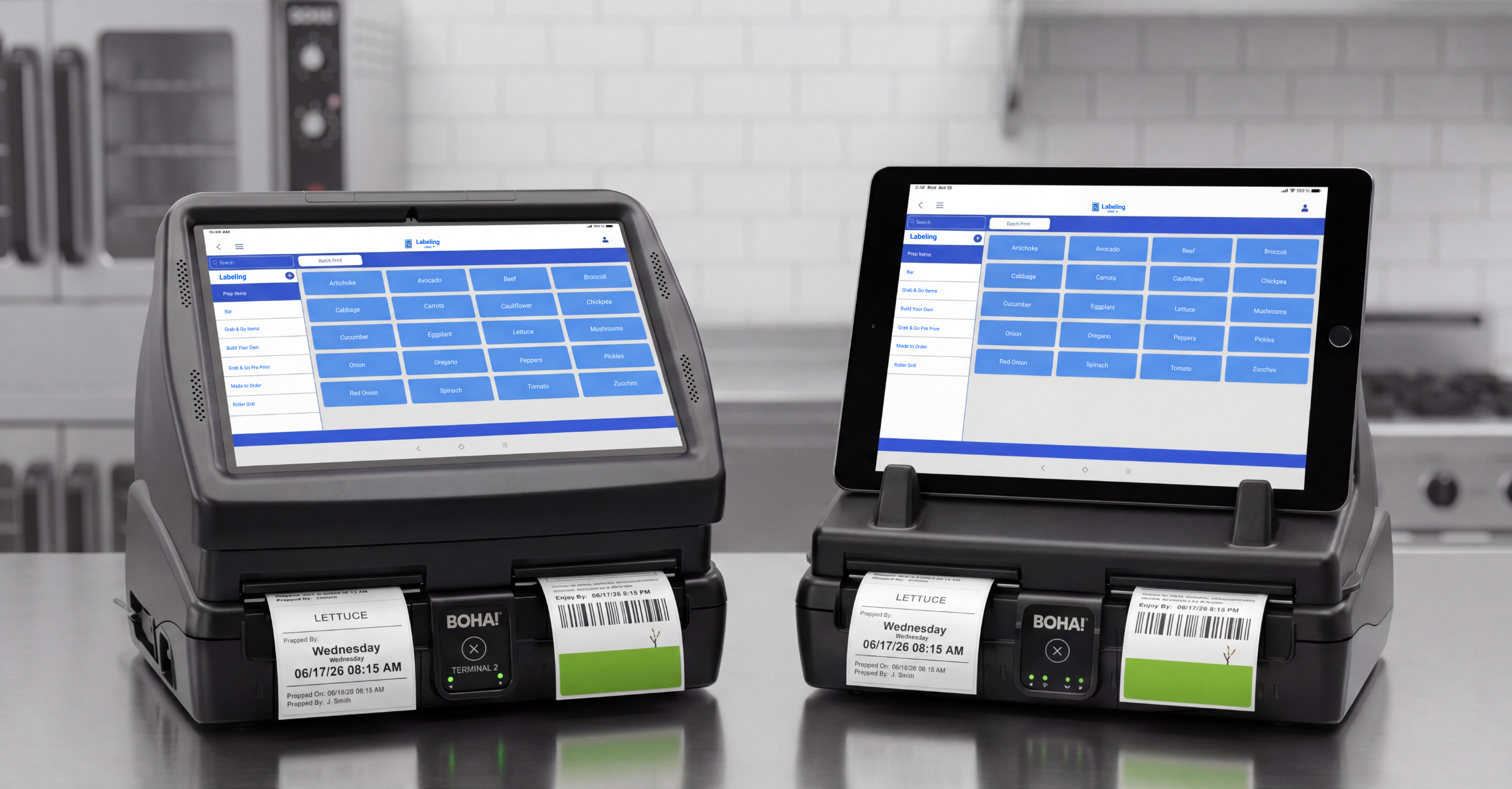
BOHA! T2, formerly BOHA! Terminal 2, and BOHA! WorkStation both support high-volume BOHA! labeling workflows. T2 is the fixed terminal option. WorkStation is the mobile option with a detachable tablet for teams that need to bring the screen to where the work happens.
For operators evaluating fixed vs. mobile food labeling hardware, the choice should start with the workflow.
T2 and WorkStation start from the same BOHA! foundation
BOHA! T2 and BOHA! WorkStation are both part of the BOHA! hardware portfolio. Both are built to support BOHA! labeling and workflow access in foodservice environments where labeling is part of daily execution.
Both products can support high-volume label output, consistent food labeling workflows, and access to BOHA! Labeling, as well as the broader BOHA! platform. Both help teams move away from handwritten labels, manual date calculations, disconnected tools, and shift-by-shift labeling habits.
In practice, both products help teams make labeling easier to repeat, easier to train, and easier to standardize across locations.
That shared foundation is important because the hardware decision is not about choosing between two separate labeling systems. Operators are choosing the hardware model that best fits how their teams access BOHA! workflows, manage labeling execution, and support a larger food prep and labeling program.
The difference is the physical workflow model: whether the screen should stay with the printer or move closer to the work.
The real difference is fixed vs. mobile
BOHA! T2 keeps the touchscreen and printer together in one fixed access point. It gives teams a central place to select labels, follow BOHA! workflows, and print the labels needed for prep, storage, food rotation, grab-and-go, and related back-of-house work.
BOHA! WorkStation supports high-volume BOHA! labeling as well, but with a detached tablet wirelessly. That gives staff a way to bring the screen closer to the work area while the printer remains available for label output.
For some operations, fixed hardware is exactly the point. A shared station can reduce variables, keep the process visible, and make labeling easier for multiple employees to access throughout the shift.
For other operations, the labeling decision may happen away from the printer. A team member may need to inspect the case, confirm what is missing, check a batch, validate a label type, or review an item before printing. In those workflows, the screen may need to travel to the decision point.
The hardware decision depends on where labeling decisions happen, who needs access, and whether the workflow benefits more from anchored execution or mobile validation.
Choose T2 when the hardware should stay anchored
BOHA! T2 is a strong fit when the operation needs one fixed, shared place for labeling work.
That can be especially useful in foodservice environments where labeling happens near a central prep area, storage area, or back-of-house station. Employees know where the hardware lives. Managers know where the workflow happens. The screen and printer stay together, so the process does not depend on someone finding a tablet, carrying a device, or returning hardware to the right location.
BOHA! T2 is often a better fit when the operation wants a simple, consistent access point for repeated labeling work, such as:
- A central prep area where all ingredients are prepared and labels are printed
- A cafeteria ordering station where made-to-order items are prepared and presented to patrons
- A convenience store with a fresh food program needing to ensure all grab-n-go items are properly labeled
- A muti-location deli that prides itself on weekly specials with new ingredients where new items are added and need labeling on a regular basis
- A commissary kitchen, serving multiple stores, is receiving new bulk ingredients every day that quickly needs to be broken down into store-level batches
- In these environments, fixed hardware supports familiarity and repeatability, reducing the chance of error.
That does not mean the workflow is basic. A fixed station may support different label formats, label media, item types, and other BOHA! workflows. The value is that those workflows come through one known access point.
For teams that need high-volume label output from a consistent location, T2 gives labeling a fixed home.
Choose WorkStation when the screen needs to move
BOHA! WorkStation is a better fit when staff need to bring the screen closer to the place where the labeling decision happens.
That can be useful when work is spread across display cases, sushi counters, grab-and-go coolers, storage areas, prep zones, or larger facilities with multiple kitchens where the employee needs to see the item or area before choosing the label.
In those workflows, the decision may not happen at the printer. The team member may need to check what is missing from a case, confirm which trays need to be replenished, validate a batch, or decide which label should be printed after seeing the work area.
WorkStation supports that kind of mobile, point-of-work labeling model, especially for:
- Sushi counters
- Grab-and-go programs
- Large or distributed prep areas
- Storage zones away from the printer
- Trusted staff who validate work completion before printing
- Mobile-first execution across multiple work zones
The key is not mobility for its own sake. The key is whether the screen needs to be closer to the work before the label is selected.
If the employee can make the right labeling decision from one central station, T2 may be the cleaner fit. If the employee needs to inspect the item or work area first, WorkStation may better match the workflow.
How to decide which hardware fits your operation
A good hardware decision starts with a simple question:
Where does the labeling decision happen?
If the answer is usually “at the station,” T2 may be the better fit. If the answer is “often all over… at the case, cooler, counter, prep area, or storage zone,” WorkStation may be the better fit.
The table below can help operators compare BOHA! T2 and BOHA! WorkStation based on workflow fit.
| Operational Need: | Best-fit Hardware: | |
| BOHA! T2 | BOHA! WorkStation | |
| Fixed central prep station | ✓ | |
| Hardware is anchored to workflow place | ✓ | |
| Mobile tablets are not allowed | ✓ | |
| New or rotating staff need one obvious place to go | ✓ | |
| Screen needs to move to the case, prep area, or storage | ✓ | |
| Labeling decisions require seeing the item, case, or work area first | ✓ | |
| Staff validate work before printing | ✓ | |
| Work happens far from the printer | ✓ | |
| Mobile-first execution is part of the operation | ✓ | |
| Multiple work zones need labeling access | ✓ | |
| High frequency label printing is needed to support operations | ✓ | ✓ |
| Central prep and distributed work areas | ✓ | ✓ |
| Multiple interconnected BOHA! hardware devices may be needed in a larger operation | ✓ | ✓ |
| Multiple label types are needed simultaneously | ✓ | ✓ |
This is not a ranking. It is a fit question.
BOHA! T2 and WorkStation solve different workflow placement problems. One anchors the screen and printer together. The other lets the screen move to the point of work.
Some operations may need both fixed and mobile labeling hardware
The decision does not always have to be either-or.
Some larger or more complex foodservice operations may need both fixed and mobile labeling hardware. A central prep station may benefit from BOHA! T2, while another area of the operation may benefit from BOHA! WorkStation.
For example, T2 may support repeated labeling at a central prep area where employees print labels throughout the shift. WorkStation may support a sushi counter, display case, grab-and-go program, or distributed prep zone where staff need to validate what is happening before printing.
That kind of setup can be useful when one operation has more than one labeling pattern.
A store may have a fixed prep station for internal food prep and storage labels, while packaged food programs or display areas require more mobile access. A commissary kitchen may need central high-volume labeling in one area and more distributed labeling access in another. A multi-location operator may standardize one hardware model in some formats and use a different model where the workflow calls for it.
Depending on configuration, larger operations can also connect multiple BOHA! hardware devices within the same environment. That can include using multiple devices together, and in some cases linking BOHA! WorkStation, BOHA! T2, and Ithaca 9000 as part of the a broader labeling ecosystem. This especially comes in handy when multiple label types are needed simultaneously to avoid inevitable errors arising from switching label types mid-shift.
The products are not trying to solve the same placement problem. They support different workflow needs inside the same operational system.
How both products support the broader BOHA! platform
BOHA! T2 and BOHA! WorkStation are hardware access points, but they are not isolated tools.
Both are part of the broader BOHA! platform, which supports connected execution across labeling and other back-of-house workflows. The hardware is where the employee interacts with the workflow, but the value extends beyond the device itself.
For foodservice operators, that connection can support:
- Standardized food prep and labeling workflows
- Consistent label formats across teams and locations
- Operational automation for repeated back-of-house tasks
- BOHA! module access based on the operation’s configuration
- A clearer path from approved standards to store-level execution
- Control Center visibility for managers and multi-location operators
- Brand consistency across prepared food, grab-and-go, and food program workflows
Labeling is not only about producing a piece of paper or label media. While that is the desired output, the larger goal is making sure the right workflow reaches the right employee at the right point in the shift to produce the right output, whether it be a label, a completed task, or assurance that things were done right.
A fixed station can support that by keeping access anchored. A mobile tablet can support that by bringing access closer to the work. In both cases, BOHA! helps connect the workflow back to the standards behind it.
For multi-location foodservice operations, a label format, item setup, or operational standard may be created centrally, but it still has to be communicated and followed in the store, kitchen, counter, prep area, or production zone. BOHA! hardware gives teams a practical way to access those workflows during daily execution.
Fixed and mobile hardware both have a place
Choose BOHA! T2 when the goal is a fixed, centralized, high-volume prep or labeling station. T2 is built for environments where the screen and printer should stay together and where teams need a shared access point for repeated labeling work.
Choose BOHA! WorkStation when the screen needs to move. WorkStation is built for environments where trusted staff need mobile access to validate work at the point of work before printing.
Both products support BOHA! labeling workflows. Both can help operators improve consistency and execution. The decision is about where the screen belongs during the shift.
For some operations, that place is the station.
For others, it’s wherever the work is happening.
Best fit summary
BOHA! T2 is best suited for operations that need a fixed food labeling terminal, a central labeling station, high-volume label output from one shared location, and a screen and printer that stay together for consistent employee access.
BOHA! WorkStation is best suited for operations that need a mobile food labeling system, a detachable tablet for staff, tablet-based food labeling at the point of work, and BOHA! workflow access away from the printer.
Next in the BOHA! Built series
T2 and WorkStation support high-volume BOHA! labeling and workflow access. But some print jobs call for a different kind of tool.
Next, we’ll look at Ithaca 9000, the specialty printer for receipts, sticky-backed receipts, order management in the kitchen, delivery workflows, and custom label formats.
Frequently asked questions about BOHA! T2 vs. BOHA! WorkStation
These FAQs cover common questions about choosing between BOHA! T2 and BOHA! WorkStation, including when fixed labeling hardware makes sense, when mobile labeling is a better fit, and how both products support BOHA! Labeling workflows.
What is the difference between BOHA! T2 and BOHA! WorkStation?
BOHA! T2 keeps the screen and printer together in one fixed station. BOHA! WorkStation works with a detached tablet, allowing staff to bring the screen closer to the point of work while still connected wirelessly to BOHA! labeling workflows.
Is BOHA! T2 or BOHA! WorkStation better?
Neither product is automatically better. The right fit depends on the workflow. BOHA! T2 is best for fixed, central, high-volume labeling. BOHA! WorkStation is best for mobile, point-of-work labeling and validation.
When should an operation choose BOHA! T2?
An operation should choose BOHA! T2 when labeling happens mostly near one shared station, when the hardware should stay in one place, when company policies do not allow for mobile device use in the back-of-house, or when many employees need consistent access to the same fixed labeling terminal.
When should an operation choose BOHA! WorkStation?
An operation should choose BOHA! WorkStation when staff need to move the screen to a display case, cooler, prep area, sushi counter, or storage zone before selecting or printing a label.
Can BOHA! T2 and BOHA! WorkStation be used together?
Yes. Some larger or more complex operations may use fixed and mobile BOHA! hardware together, depending on configuration. T2 may support a central prep station, while WorkStation supports display cases, grab-and-go areas, sushi counters, or distributed prep zones.
Do both products connect to BOHA! Labeling?
Yes. BOHA! T2 and BOHA! WorkStation both support BOHA! Labeling workflows and the extended BOHA! platform. The difference is not the labeling foundation. The difference is whether the screen stays fixed with the printer or can move with trusted staff.