
By Stephen Crump, Head of Product Management, TransAct Technologies | BOHA! Built
What teams see is only part of the BOHA! system
In the back-of-house, it’s easy to judge hardware by the task happening on the screen. Someone prints a label, opens a checklist, starts a timer, or checks the next step in a routine, and the device becomes associated with that single action.
That is often how teams first understand BOHA! T2, formerly known as BOHA! Terminal 2, especially because labeling is one of the most visible workflows it supports. Labels are needed throughout prep, storage, product rotation, grab-and-go production, and other daily foodservice routines, so the printer side of T2 is naturally what many people notice first.
The first article in this BOHA! hardware series focused on T2’s role as a dedicated labeling station.
But T2 is not only there to print labels quickly and quietly.
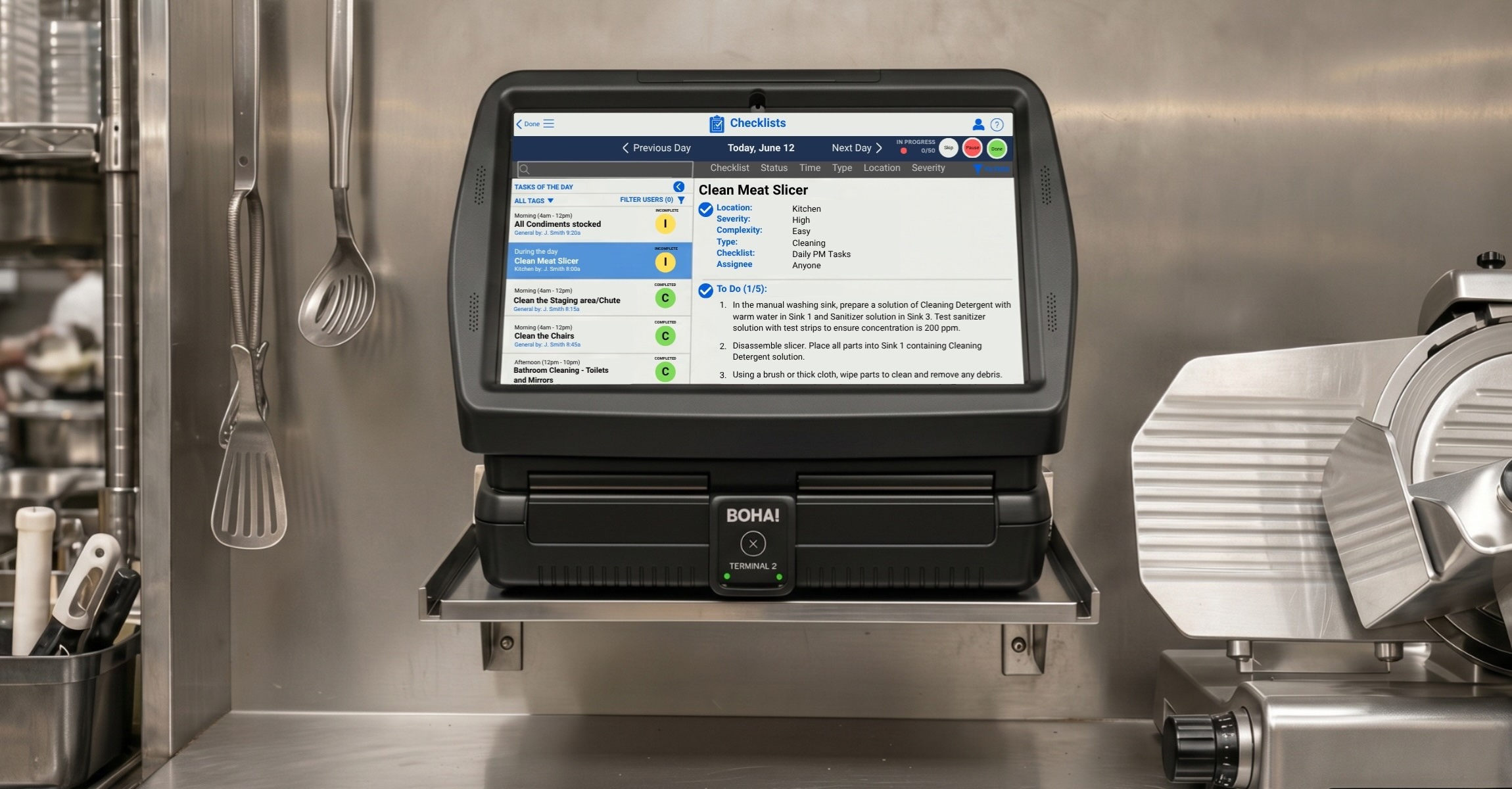
BOHA! T2 is a fixed BOHA! hardware access point that keeps the screen and printer together, giving teams a controlled station for labeling, food prep management, operational workflows and checklists, timers, staff training, and other back-of-house workflows.
The more useful way to look at T2 isn’t only by what it prints, but what it helps teams access and execute during the shift.
For operations that want a fixed station teams can return to throughout the day, T2 gives staff one consistent place to access the daily workflows that keep the kitchen moving.
BOHA! T2 connects teams to the larger BOHA! platform
Aside from the labels it produces, BOHA! T2 is the part of the BOHA! system staff interact with most directly during the shift. They can walk up to the screen, choose the workflow they need, print a label, start a timer, open a checklist, or pull up training content before getting back to the work in front of them.
That interaction may be quick, but it is BOHA! T2’s connection to the larger BOHA! platform that enables that speed.
BOHA! T2 gives staff a fixed access point into BOHA! workflows. Depending on the operation’s configuration, those workflows may support labeling, food prep management, checklists, timers, HACCP reporting, training, and other daily routines. The details vary by operation, but the role of the terminal stays the same. It gives those workflows a familiar place in the back of house.
The label, prepped ingredient inventory, operational workflow, cooking timer, checklist step, or training guidance is what the team uses from T2 to complete tasks correctly in the moment. The workflow behind it helps determine what information appears, which process staff follow, and how consistently the task can be completed across shifts or locations.
T2’s role is different from a standalone device because it gives those workflows a familiar place in the back-of-house. Staff are not relying on a potentially misplaced tablet, a paper process, or memory to figure out what comes next.
For operators, the connection between the physical station and the broader digital BOHA! platform is central to the value. When staff uses T2 during the shift, that connection helps support the brand standards, content, and operational routines behind the work.
Why some operations need workflows anchored in one place
Not every foodservice operation wants screens moving from station to station.
Mobile access can be useful when the work happens away from the printer, and that will be an important part of the BOHA! hardware story when we cover BOHA! WorkStation in the next article. BOHA! T2 supports a different operating model.
For some operations, the better fit is a station-based setup where the screen and printer stay together. That setup can be especially useful in high-volume environments where teams need a frequently accessed shared station, managers want consistent hardware behavior, and operators want BOHA! workflows available from a familiar place during the shift.
A fixed station can also make the workflow easier to train around. Staff know where to go, managers know where the process lives, and the hardware stays tied to the area where the work is expected to happen. In kitchens with high turnover, fast-moving shifts, standardized station roles, or tightly defined routines, that predictability can be part of what keeps the workflow moving.
The point is not to make every workflow stationary. It is to match the hardware setup to the way the operation actually runs.
Some kitchens need the screen to move with the work. Others need a shared station that stays put. BOHA! T2 supports the second model by giving BOHA!-supported workflows a fixed, familiar place in the back-of-house.
From labeling to food prep, checklists, timers, and training
Labeling is often the first BOHA! T2 workflow teams notice because it is visible, frequent, and tied directly to daily foodservice execution. It’s also only one part of what teams may need to manage from the T2 device.
Work in the back of house is made up of routines that must happen while the shift is already moving. Food must be prepped, labels need to be printed, tasks need to be completed, timers should be followed, HACCP reports need to be reviewed, and training content may need to be available when someone is learning a process or confirming a step.
BOHA! T2 gives teams a consistent place to access BOHA! workflows that support those routines. Depending on the operation’s configuration, that can include:
- BOHA! Labeling for prep and date-code labels, grab-and-go labels, ingredient information, allergen details, nutritional facts, barcodes, and any custom graphics across standard and one-off specialty items the kitchen has for sale.
- BOHA! Food Prep for managing prepared food inventory, prep workflows, and daily production reporting, helping staff identify, quantify, and manage prepared ingredients while determining how much more needs to be made to keep up with demand.
- BOHA! Checklist for recurring tasks such as station checks, opening and closing routines, cleaning steps, and other back-of-house responsibilities.
- BOHA! Timer for timing routines, prompts, and real-time alerts that need to stay visible during prep, holding, production, or other time-sensitive workflows.
- BOHA! Media for process guidance, instructional and training material, recipe cards, and standard operating information staff may need during the shift.
- HACCP Reports for viewing temperature-related food safety information captured and organized from BOHA! Temp and BOHA! Sense, when those modules are part of the operation’s BOHA! configuration. This gives teams access to reporting that can support health inspection and audit readiness, equipment visibility, monitoring, and store-level food safety execution.
The value is not only in having separate modules available. It is in giving teams a more consistent way to access the tools, guidance, and support for the workflows they already rely on throughout the day.
BOHA! T2 gives those workflows a fixed place in the kitchen, so staff can return to the same station instead of piecing together tasks across separate tools, paper processes, or disconnected devices.
How a fixed access point supports repeatable execution
Repeatable execution usually comes from the way everyday work is set up.
In a busy foodservice environment, even simple tasks can become inconsistent when the process depends on memory, personal habits, paper notes, or whichever device happens to be available. The work may still get done, but the path changes from person to person and shift to shift.
An anchored station can help reduce that variability.
When teams use the same station to access the same workflows, the process becomes easier to train and easier to repeat. Managers have a clear place to point staff, and newer employees can learn where the work happens instead of remembering multiple devices, binders, paper checklists, or workarounds. During a busy shift, that kind of simplicity can make it easier for a shift lead to keep the team moving without stopping to explain which tool or process to use.
That consistency becomes more useful as workflows show up at different points throughout the day. Prep likely begins before the rush, checklist procedures support opening, closing and maintenance routines throughout the day, timers are used to manage food being prepared or held as well as other timed processes, and labels may be needed as ingredients, containers, and packaged items move through the operation. Training content will also come into play when someone is learning a process or confirming how a task should be completed.
When those workflows are scattered, execution becomes harder to control.
BOHA! T2 helps bring these scattered workflows to a shared station. The hardware stays in place, the workflow experience stays familiar, and staff can return to the same screen-and-printer setup instead of adjusting to a different process depending on the shift, station, or person working.
For operators, T2 supports back-of-house workflow automation in a practical way. The goal isn’t to add more steps to the kitchen. It’s to make the right steps easier to find, follow, and repeat during the normal pace of the shift.
Connecting store execution to corporate standards
For multi-location operators, corporate standards can only impact process control and business management when they can make their way into daily store execution.
A label format, prep routine, procedural checklist, training process, or food safety and preparation program requirement may be created at the corporate level, but it still has to be followed by the team working in the back of house within every location. If those standards live only in a document, binder, or disconnected system, each location can start to interpret the process a little differently or, in the worst case, lose track of it altogether.
BOHA! helps connect the workflows staff use during the shift with the standards operators need to manage across locations. BOHA! T2 gives store teams a fixed access point in the back-of-house, while the broader BOHA! platform helps operators manage the workflows, updates, content, and routines behind that experience.
The interconnectivity of the BOHA! platform enables centralized teams to manage workflow content and operational updates across different types of foodservice operations and kitchen formats. Whether an operation includes a standard foodservice restaurant, franchised concept, campus or business dining program, commissary kitchen, or kiosk service, the ability to distribute the right information, policies, and procedures to the entire team is an invaluable capability built into the platform.
Corporate teams may need to update label formats, adjust prep routines for better efficiency, manage checklist requirements, support brand standards, or improve visibility into how work is being carried out across stores. When those updates are connected through the BOHA! platform, approved changes can be made available across locations immediately and become part of the workflows staff actually use.
A common foodservice example is when a corporate team adds a new weekly special that uses a new ingredient. That menu item may require new prep labels, new grab-and-go labels with updated ingredient and allergen information, accurate nutritional details, cooking instructions for staff, a time-dependent process step, and a new cleanup procedure once the item has been prepared.
Without a connected system, each part of that change can become its own communication challenge across locations and within individual kitchens. One team may update the label format, another may need to explain the cooking process, another may need to add the timed step, and store-level staff still need a clear way to follow the updated process during daily work. Whether an operator manages a single concept or multiple concepts from one account, BOHA! can help make changes process easier to manage across the tools, content, and workflows staff use at the store level.
With BOHA!, all of these changes can be managed through the broader platform from a central location and communicated throughout the system, enabling BOHA! T2 to become the store-level place where approved standards turn into something staff can actually use during the shift. A workflow created or approved centrally can show up at the facility where the work is happening, giving teams a clearer way to follow the process.
For a single location, that can make daily routines easier to track and manage. Across multiple locations, it can help keep approved processes from becoming too dependent on individual habits, localized training, or how a specific team has always done the work (“it’s just the way it’s always been”).
A food program may have strong standards on paper, but the real test is how those standards hold up over the course of many shifts. If one location handles labels one way, another approaches prep routines differently, while a third team trains around a slightly different checklist process, consistency becomes harder to protect.
BOHA! hardware, like BOHA! T2, helps make that connection visible in the store. The terminal is what the team interacts with during the shift, while the platform behind it helps support consistency, accuracy, and visibility across locations.
From hardware access to operational visibility
BOHA! T2 is not meant to solve every back-of-house challenge on its own. Its role is more focused. It gives kitchen teams a practical place to use BOHA! workflows during the shift.
Operators can only monitor standardized workflow execution if teams have a practical way to understand and complete the work during the shift. When a process is hard to find, hard to follow, or disconnected from the way the kitchen moves, it becomes harder to see how consistently that work is happening across locations.
That’s why hardware access is important. Back-of-house workflow automation cannot live only in a corporate system. It has to be usable by the people doing the work.
BOHA! T2 helps bring those workflows into the daily operating environment, giving teams a fixed place to follow the process and giving operators a stronger foundation for consistency across locations.
BOHA! T2 and BOHA! WorkStation support different workflow models
BOHA! T2 and BOHA! WorkStation are part of the same broader hardware conversation, but they support different ways of working in the back of house.
BOHA! T2 keeps the screen and printer together in one fixed station. That makes it a strong fit when operators want BOHA! workflows available from a shared back-of-house location and want label output tied to the same hardware point.
WorkStation supports a different workflow need. The tablet is separate from the printer, giving staff a way to bring the screen and access to BOHA!’s digital tools closer to the work when the task happens away from the printer.
The right choice depends on how the operation is set up. Some teams need hardware that stays put because the workflow is shared, station-based, or easier to train around from one familiar place. Others need a screen that can move with the work as staff move through different areas or tasks. Larger operations may use both models depending on the workflow, station, team, or location.
T2 fits best when BOHA! workflows need a fixed, shared place in the back-of-house.
For those environments, the screen, printer, workflows, and daily routines come together at one shared station.
Best fit for BOHA! T2 as a workflow access point
BOHA! T2 is best suited for operations that want a fixed BOHA! access point for daily back-of-house execution.
It can be a strong fit for teams that need:
- A shared screen-and-printer station
- Access to BOHA! Labeling from one familiar hardware point
- Food prep workflows staff can return to during the shift
- Digital checklists for recurring back-of-house routines
- Timer workflows that support prep, holding, production, or other time-sensitive tasks
- Training or media content available in the kitchen environment
- A consistent station for onboarding, training, and repeated daily use
- Better alignment between store-level execution and corporate standards
For operators that want BOHA! workflows in one fixed back-of-house location, T2 provides the hardware foundation.
Next in the BOHA! Built series
T2 keeps BOHA! workflows anchored in common back-of-house stations, but not every workflow is best served from stationary screens.
In the next article, we’ll look at how BOHA! WorkStation brings the screen to the work with a detachable tablet that supports mobile labeling, point-of-work validation, and distributed back-of-house workflows.
Frequently asked questions about BOHA! T2 and BOHA! workflows
These FAQs explain how BOHA! T2, formerly known as BOHA! Terminal 2, connect to broader BOHA! workflows when a fixed back-of-house access point can be useful for foodservice operations.
What does BOHA! T2 connect to?
BOHA! T2 can serve as a fixed access point for BOHA! workflows such as labeling, food prep, checklists, timers, HACCP reports and audit readiness, and training content, depending on the operation’s configuration.
Is BOHA! T2 only used for labeling?
No. BOHA! T2 includes integrated label printing and is often used for high-volume, high-frequency labeling, but it can also act as a fixed station for broader BOHA! workflows that support back-of-house execution.
When is a fixed BOHA! access point useful?
A fixed BOHA! access point can be useful when operators want workflows available from one shared back-of-house station. This can help teams train around a consistent location, return to the same workflow experience during the shift, and support repeatable execution in busy environments.
How does BOHA! T2 support operational consistency?
BOHA! T2 supports operational consistency by giving teams a familiar place to access BOHA! workflows, follow approved processes, and complete recurring back-of-house tasks from a fixed station.
How is BOHA! T2 different from BOHA! WorkStation?
BOHA! T2 keeps the screen and printer together in a fixed station. BOHA! WorkStation separates the tablet from the printer so staff can bring the screen closer to the work when mobility is a better fit.
How does BOHA! help connect store execution to corporate standards?
BOHA! helps connect store execution to corporate standards by giving operators a way to manage approved workflows, content, updates, and routines through the broader platform, then make those workflows accessible to store teams through hardware such as BOHA! T2. For example, a corporate team may update a label format, food prep planning, training step, timer workflow, or checklist process. T2 gives staff a fixed place to access that approved workflow during daily work in the back-of-house, helping locations follow the same process instead of relying on paper instructions, memory, or local workarounds.